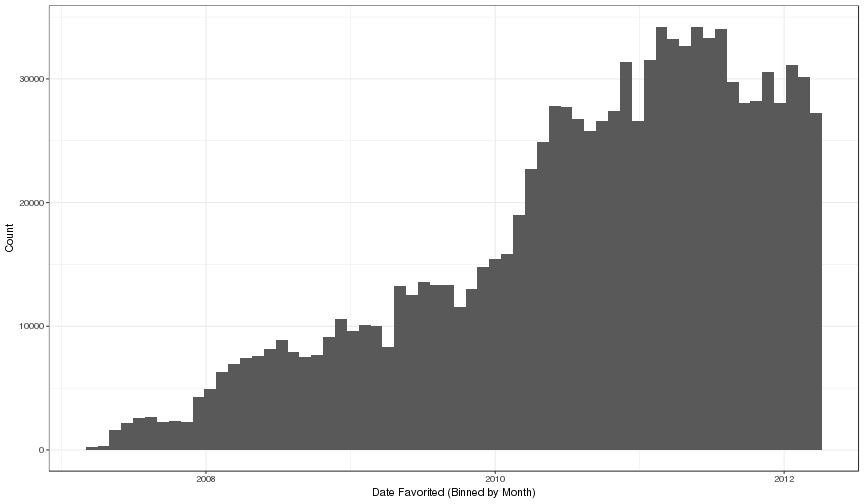
Each row in this table represents the event of a user adding a project to their favorites, i.e., bookmarking it. The list of favorites appeared in the user's profile page, which was publicly visible on the Scratch website.
"Favoriting" was designed as a way for projects to be bookmarked by users. Compared to "loving", "favoriting" was not intended for showing appreciation for a project, and a favorite count was never visible on project pages. A user could add a project to their favorites by clicking on an "Add to favorites?" link on any project’s page. This link was enabled only for users were logged in. A user could add or remove projects from their favorites list. Projects could only be added once.
This table includes 1,041,387 observations. Each row of this table corresponds to a single relationship (i.e., a user favoriting a project).
| Variable | Type | Description |
|---|---|---|
| project_id | integer | Unique identifier for the project that is being "favorited" (see the projects table). |
| user_id | integer | Unique identifier of the user who has added the project to their favorites and on whose profile page the favorite project is listed (see the users table). |
| date_favorited | datetime | The date and time that the user favorited the project. A project can only be favorited once by a given user. |
First, we remove 485 observations which are duplicated (i.e., other observation record the same person favoriting a project). We believe that these were due to errors in the website software. We retain the observation associated with the first recorded favorite in these cases.
Second, we remove entries by users who have been deleted, or to projects that have been deleted. These two are not mutually exclusive. The cross tabulation below shows the distribution:
| Users Exists | Project Exists | Count |
|---|---|---|
| FALSE | FALSE | 1106 |
| TRUE | FALSE | 119095 |
| FALSE | TRUE | 7175 |
| TRUE | TRUE | 1041387 |
We retain only the 1,041,387 observations that represent instances where both the user and project exists in our database.
These data are access restricted. Details on gaining access are provided in the "Permission to Use Datasets" section of the overview page.